Appearance
Edit Account Attributes
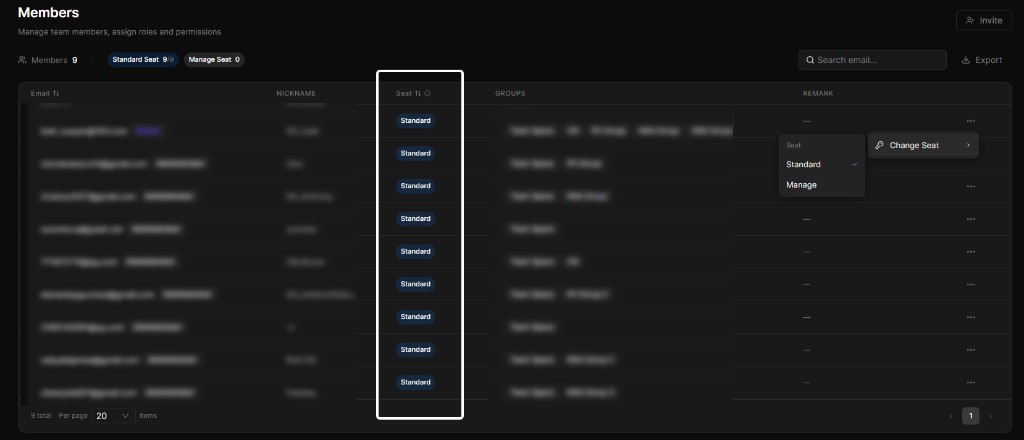
In MySpace → Team Manage → Members, each member has a Seat value that controls whether they can use D5 products and whether they count toward your paid team seats. (This is also referred to as the member's account attribute.)
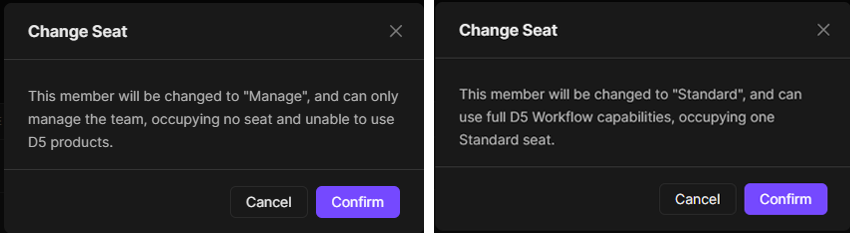
When owner or admin members do not need to use D5 Render—for example, IT staff or managers who only handle team administration—you can set their Seat to Manage so they do not occupy a paid team seat.
Seat types
Standard
Standard — Access the complete D5 workflow, including advanced and AI features in D5 Render, Arco, Lite, and more.
- Uses a paid team seat.
- Supports logging into D5 Launcher and the Showreel platform with team credentials.
Manage
Manage — For team management only; cannot use D5 products and does not use a paid team seat.
INFO
Manage is a Seat setting (not a role). It is intended for team owners, IT staff, or managers who need access to the Team Management Backend but do not use D5 Render, Arco, Lite, or other D5 products themselves.
- Does not use a paid team seat and is not billed as one.
- Cannot use D5 products under the team identity.
- Does not support logging into D5 Launcher or the Showreel platform with team credentials.
- If the account's role is Owner, Administrator, or Group Administrator, it can still sign in to the Team Management Backend (for example, to invite members).
If the Seat is Manage, logging into the D5 Launcher shows a personal identity or prevents using team identity benefits; Showreel may not appear in MySpace, or the account may be unable to open the Showreel platform. The account can still choose personal or team identity when logging into MySpace for administration.
Change Seat settings
Note
Changing Seat settings is supported only for Owner, Super Team Admin, and Super Group Admin.
- You can switch a member from Standard to Manage, or from Manage to Standard.
- Only accounts with the Administrator role or higher can be assigned the Manage Seat.
- By default, newly invited members are assigned Standard.